


Do you ever copy a thousand of files like pictures, videos, music or documents in a copy paste session?
Do you ever think about "no to all" option to be there in your XP Operating System when you are copying those files? I do.
Those which we copy may have a same filename, and windows will ask about the replacement. There are only 3 options there "Yes to all", "Yes", "No", and "cancel".
"Then we need to keep clicking "no" to every files that have a same filename? That's gonna eats much time, isn't?
I just found an alternative for "no to all" option recently. This alternative doesn't needs any modification on registry, aplication, or program. This trick can be very usefull when you want to copy thousand of files but don't want to overwrite any files.
You can keep clicking no, if you want to kill your time. BUT, for does who don't want to wasting times. There is a hidden trick to tell windows not to overwrite/replace files with the same filenames, and windows will skip them over.
THEN HOW?
When Confirm File Replace dialog box appear, simply HOLD SHIFT BUTTON and click "NO" button.
And windows will not ask you about the replacement for that Copy-Paste session.
As I remember, in Windows Vista there is "No to all" in the Confirm File Replace dialog box. But it's will be usefull if we still using windows XP. ^^
Hope it's Helping
You're the
 Visitors &
 Page Views.
Visitors &
Page Views.
Saturday, August 30, 2008
Alternative for "No to all" option
Friday, August 29, 2008
Buy iPhone 3G gets 3 iPhone Girl pics
"iPhone Girl" that's what they called. One man who known as "markm49uk" a member from MacRumors forum just buyed an iPhone 3G at 20 august 2008 in United Kingdom and did found the iPhone Girl pictures as the home screen at his iTunes.
What a lucky guy who get a Special Edition of iPhone 3G(iPhone 3Girls)^^
This iPhone girl identified as a Chinese girl who works in the Foxconn Shenzhen factory in China making the new Apple iPhone 3G. This girl 'fame' rise up very fast at 20 august 2008, just within hours the pics went around the globe.
The three pictures, posted on the Apple discussion Web site MacRumors.com, show a young Asian woman working on what appears to be an assembly line for iPhones.
Dressed in a pink striped outfit and hat and wearing white gloves with yellow fingertips, the young woman now known on the Web as the "iPhone Girl" is shown smiling and making victory signs as she poses next to an iPhone.
Many people searching more about this girl, just like did she fired or not because of this mishap.
A representative from Foxconn factory did said "She is definitely not fired,"an unidentified representative from Foxconn's factory in Shenzhen, southern China, told the newspaper Nandu Daily.
South China Morning Post on Wednesday quoted another Foxconn spokesman, Liu Kun, as confirming that the young woman in the pictures works for Foxconn.
Liu said workers testing the device took the pictures and may have forgotten to delete them, the Post reported.
Since being released on August 20 the story has been featured in the mainstream Media around the world.
South China Morning Post has reported:
"The unnamed employee's growing fame (she has predictably become a Digg hit and is supposedly being stalked by paparazzi) has freaked out the one they're calling "iPhone girl." "She's just a young girl who has come to the city from her remote hometown. She's never been in such a situation. She's really scared by the media. She told me she wanted to quit her job and go back home to get away from this. We let her off work today so she could rest."
These are the pics of the girls:
These is the EXIF data for IMG_0010File name: IMG_0010.jpg
File size: 378628 bytes (0x0, infbpp, 0x)
EXIF Summary: f/2.8
Camera-Specific Properties:
Equipment Make: Apple
Camera Model: iPhone
Camera Software: QuickTime 7.5
Image-Specific Properties:
Image Orientation: Top, Left-Hand
Image Orientation: Top, Left-Hand
Horizontal Resolution: 0 dpi
Vertical Resolution: 0 dpi
Image Created: 2008:08:15 13:36:36
F-Number: f/2.8
Color Space Information: Uncalibrated
Other Properties:
Resolution Unit: i
Chrominance Comp Positioning: Centered
Exif IFD Pointer: 238
Compression Scheme: JPEG Compression (Thumbnail)
Horizontal Resolution: 0 dpi
Vertical Resolution: 0 dpi
Resolution Unit: i
Offset to JPEG SOI: 458
Bytes of JPEG Data: 5655
Chrominance Comp Positioning: Centered
Exif Version: 2.20
Image Generated: 2008:07:26 07:20:23
Image Digitized: 2008:07:26 07:20:23
And this is the date/time info for all the photos:
Date Time: 2008-07-26 T07:20:04+01:00 (IMG_0007)
Date Time: 2008-07-26 T07:20:09+01:00 (IMG_0008)
Date Time: 2008-07-26 T07:20:19+01:00 (IMG_0009)
Date Time: 2008-07-26 T07:20:23+01:00 (IMG_0010)
From many sources ^^


Tuesday, August 26, 2008
Your Inner Athlete from Windows Live
I just read an e-mail from windows live today. It's like a fun game for me, but it will helps you what sport that is suitable to you or similar to your personality. IMHO: this program should be published when the opening of Beijing Olypiade 2008, not after it. Also, don't forget to Turn On your Volume! ^^
Windows Live did only ask 8 Quetions. I did got Tennis Player at the first time. However, I did like to got Badminton Player. ^^
The slogan for this is:
There’s an athlete in all of us.
I think it's just for FUN, you can also upload your headshot. I mean picture of your head for the flash animation after the last quetion answered.
TRY IT! @ RevealYourInnerAthlete.WindowsLive.com.

Wednesday, August 20, 2008
10 Greatest Pieces of Gaming Stuff to be a Greatest Gifts
"Sorry for waiting for long time, there is some problem went I was Publishing my posting in the last few days. Btw, Did you ever thinking to find something GOOD, NICE, PERFECT, WONDERFUL, and WOW for a gamer maniac?
I did got some example from another blog."
10 GREATEST GIFT FOR GAMERS ^^
GO FOR THE GAMER ^^
10. Metal Gear Solid 4's Headset

9. Final Fantasy Special Edition Potions

FIND MORE @
The 10 Greatest Pieces of Gaming Merch We'd Kill For - SlobsofGaming.com Read More......
Thursday, August 7, 2008
G.ho.st - A free Web-based Virtual Computer for every human being
G.ho.st is not ghost that are scaring u ^^. G.ho.st stands for Global Hosted Operating System. It's a new free service "for every human being" they said which providing a virtual computer, WebOS, and online storage for absolutely free.
This service had been the best for its type. Many award had been also given to G.ho.st, just like :u can see more awards @ G.ho.st Latest News
Features in G.ho.st:
You can also get plus 1GB for referring G.ho.st to your friends, be sure to make me as referrer when you're filling the information on the first time you using G.ho.st ^^
My email in g.ho.st is : mickeel@g.ho.st
To me, G.ho.st can protect us from the virus when we are surfing the internet by using G.ho.st browser. Howefer, according to the info in G.ho.st Key features
"Yes G.ho.st runs within the browser but also contains a browser of it's own! Whichever computer you are on, the G.ho.st Browser will have your history, your webmarks, and your "cookies" so that other sites will recognize you"
There is one more thing I want to tell you, that because of visitors that accessing g.ho.st around the globe. U should understand that it will be hard to access g.ho.st, so be patient ^^
You can find many things and info for g.ho.st at the website.

Wednesday, July 30, 2008
VEOH is no longer available in 170 countries
Hello all, I just tried to open a video in VEOHI tried a to use an anonymous proxy program(ultrasurf).
website.. But then "VEOH is no longer available in
Indonesia". Even I rarely open VEOH, I feel a little disappointed."
When I tried for the first time, It's say "VEOH is no longer available for ANONYMOUS PROXY". But a moment later I restart the ultrasurf and opened VEOh homepage. Even so, I still can't access any of their videos.
I did searched anyhing like news and info about the availability,and found a blog that discussed this too.ismartshare.
the blog owner did found some cause of VEOH blockage from Yahoo and Wikipedia
From Yahoo Answer :
“Unfortunately Veoh has ended service in your country due to a low concentration of users. Veoh is maintaining service in countries when we have the highest concentration of viewers.
We are sorry for any inconvenience.”
“Veoh is maintaining markets when we have the highest concentration of
viewers.”
From Wikipedia :
“Countless users from said countries are complaining about this decision on their official forums and also the fact that they were blocked out without any prior notice. The block occurred due to low concentration of visitors from the countries mentioned above, according to a representative of Veoh.”
You can see the list of blocked countries @ Wikipedia - VEOH Availability in different parts of the world
There is 170 countries that have been blocked.
Read More......
Saturday, July 19, 2008
Make your PlayStation 3 into Linux PC!!
"Did you ever imagine to make your game console into a LINUX as a PC ??
I didn't, although there is a way to make something like that.. WOW.. Isn't that amazing?" 
Step 1: Back Up

Sony hardly walks people through the conversion process—you've got to know where to look in the PS3's menus, and many of the steps can be a bit tricky. But the first procedure is a no-brainer—back up your data. That's a good idea before doing major tinkering with any PC, and it's especially smart with this project, which requires the installation of a second operating system and either reformatting or replacing the PS3's hard drive. The PlayStation's own OS won't disappear in the process (it's stored on flash memory), but saved games will be wiped clean, so it's critical to back them up. A backup command that works with any USB-connected external drive is built into the PS3 OS (it's under "System Settings"), but it will only back up saved game data. Other media files (music, video, etc.) need to be backed up manually.
Step 2: Upgrade Your Drive

PlayStation 3 ships with either a 40 or 80 GB drive. That's plenty of storage for games and could suffice for basic computing. But upgrading the hard drive on the PS3 is remarkably easy, so we saw it as a good excuse to bump up the storage capacity to a more PC-friendly level. The PS3 uses 2.5-in. laptop drives, and highcapacity replacements can be purchased from online retailers such as Newegg or Directron for $60 to $150. We went for Toshiba's capacious 250 GB—ample space for large movie, music and photo collections.
The drive is located behind a small removable panel on the side of the PS3 and can be replaced without too much muss and fuss. It is secured in a removable cage, which is held in place by one screw. The upgrade is similar to a drive replacement in a PC—old drive pops out, new drive pops in. When the console is turned on, the PS3 formats the new drive.
Step 3: Install Your New OS

This is where things get somewhat complicated. PS3 can't run Microsoft Windows or Apple's OS X but it can run Linux operating systems. There are many Linux varieties, but our favorite is Ubuntu. And it turns out that the open-source community has created a program called kboot that helps load Ubuntu onto the PS3.
To download an installation kit including both kboot and the Ubuntu OS, click right here. The file is an ISO, which can be burned to a CD or DVD to create a bootable disc with a program such as ImgBurn.
Once the partition is made, the OS can be loaded from the Ubuntu disc using the "Install Other OS" function under "Settings" in the PS3 menu. This installs kboot, which allows the PS3 to install Ubuntu.
Switching between the PlayStation operating system and Ubuntu is not as straightforward as dual booting a standard PC. In fact, after installing the kboot file, you need to delve back into the PS3's System Menu to designate "Other OS" under "Default System" before the PS3 even installs the full Ubuntu OS. When you restart the PS3, plug a mouse and keyboard into the USB ports. (PlayStation controllers are good for gaming, but terrible for computing.) The console will boot using your Ubuntu disc and install the new system. (Expect it to take about an hour.)With Ubuntu installed, you can use your PS3 to run programs such as OpenOffice for spreadsheets and word processing, Firefox for Web surfing and VLC for movie playback. In short, your console will be able to do anything a normal PC can do.
There is, however, a trick to getting back to the native PlayStation OS. To make the switch, reboot the console, and at the boot prompt, type "boot-os-game," then press Enter. This brings the PS3 back to game land.
(Photograph by Jeffrey Westbrook/Studio D)
Tutorial By Anthony Verducci
Taken from Popular Mechanics
Read More......
Wednesday, June 18, 2008
Instant Eyedropper : Identify ur pixel color-code
"Hello, this freeware is usually used to graphic
designers n webmasters, that want to identify a HTML color-code instantly from
any pixel on the screen. Which will save more time."
What is Instant Eyedropper?
Instant Eyedropper is a free software tool for webmasters that will identify and automatically paste to the clipboard the HTML color code of any pixel on the screen with just a single mouse click.
Save your time
Identification the color code of an object on the screen is usually an involved, multistep process: You press the Print Screen key to copy a screenshot to the clipboard, load a graphics-editing program, create a new file, paste the screenshot from the clipboard, zoom in on the object, use the "Pick Color" tool, and finally copy the HTML code of the color to the clipboard.
Webmasters may repeat this operation many times a day. Just imagine how much time can be saved by using Instant Eyedropper to do the same thing With a Single Click!
How it works
1. Move the mouse pointer to the Instant Eyedropper icon in the system tray.
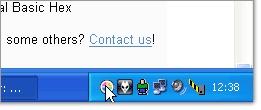
2. Press and hold the left mouse button and move the mouse pointer to the pixel whose color you want to identify.

3. Release the mouse button.
That's it.The clipboard now contains the color code - in HTML format (or any other format that you have previously specified). It can be pasted and used in any text or HTML editor or the Color Picker tool of Photoshop.
Source : http://instant-eyedropper.com/
Subscribe to:
Posts (Atom)


